


IRIS Modules Not Loading when AVG Internet Security Installed
Article ID
ias-12240
Article Name
IRIS Modules Not Loading when AVG Internet Security Installed
Created Date
1st March 2016
Problem
It has been identified that some versions of AVG Internet Security prevent a number of the IRIS modules from loading both via the Portal Menu and directly from the executable. This is a problem even though Exceptions have been set within AVG
Resolution
To resolve this issue additional settings need to be changed within AVG. Following the steps below will help you to amend these settings
Open AVG Internet Security and click Advanced Settings
From the list click Exceptions
 The current exception will indicate that it is being used by the Resident Shield and Scan Components.
Highlight the current exception and press Edit
Tick the box titled Identity Protection and then click OK.
Identity Protection will now be added to the list of Components.
Click OK to close the screens.
It will now be possible to open the IRIS Modules
The current exception will indicate that it is being used by the Resident Shield and Scan Components.
Highlight the current exception and press Edit
Tick the box titled Identity Protection and then click OK.
Identity Protection will now be added to the list of Components.
Click OK to close the screens.
It will now be possible to open the IRIS Modules
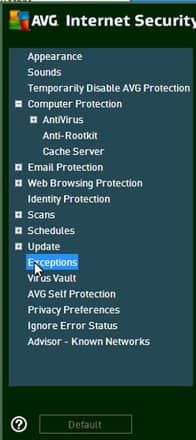 The current exception will indicate that it is being used by the Resident Shield and Scan Components.
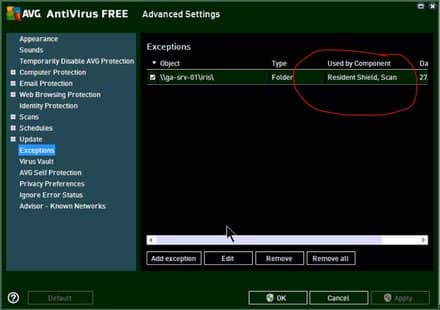 Highlight the current exception and press Edit
 Tick the box titled Identity Protection and then click OK.
Identity Protection will now be added to the list of Components.
Tick the box titled Identity Protection and then click OK.
Identity Protection will now be added to the list of Components.
 Click OK to close the screens.
It will now be possible to open the IRIS Modules
Click OK to close the screens.
It will now be possible to open the IRIS Modules
Share This Page


We are sorry you did not find this KB article helpful. Please use the box below to let us know how we can improve it.