


How do I run a ‘Client List’ with ‘Business Year End Dates’?
Article ID
ias-12194
Article Name
How do I run a ‘Client List’ with ‘Business Year End Dates’?
Created Date
8th December 2015
Problem
How do I run a 'Client List' with 'Business Year End Dates'?
Resolution
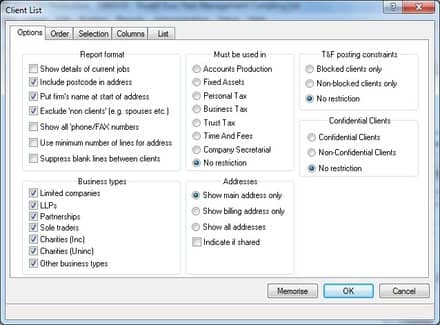
Select Client | Select | Print | Client List
 Select the List tab then click By list and then select Find
An ‘IRIS Data Mining’ screen will appear.
Under Add Criteria select Form and click the magnifying glass to give a list of options.
Select Business Year End Months
Select the required months or click Select All and then OK.
Click Add to List to include the chosen criteria then click Find. A list of clients will then appear.
Note: These can be sorted on screen by clicking each of the column headings.
If the list is to be printed select File | Print and make the selection of output as normal.
Select the List tab then click By list and then select Find
An ‘IRIS Data Mining’ screen will appear.
Under Add Criteria select Form and click the magnifying glass to give a list of options.
Select Business Year End Months
Select the required months or click Select All and then OK.
Click Add to List to include the chosen criteria then click Find. A list of clients will then appear.
Note: These can be sorted on screen by clicking each of the column headings.
If the list is to be printed select File | Print and make the selection of output as normal.
 Select the List tab then click By list and then select Find
 An ‘IRIS Data Mining’ screen will appear.
 Under Add Criteria select Form and click the magnifying glass to give a list of options.
 Select Business Year End Months
 Select the required months or click Select All and then OK.
Click Add to List to include the chosen criteria then click Find. A list of clients will then appear.
Note: These can be sorted on screen by clicking each of the column headings.
If the list is to be printed select File | Print and make the selection of output as normal.
Select the required months or click Select All and then OK.
Click Add to List to include the chosen criteria then click Find. A list of clients will then appear.
Note: These can be sorted on screen by clicking each of the column headings.
If the list is to be printed select File | Print and make the selection of output as normal.
Share This Page


We are sorry you did not find this KB article helpful. Please use the box below to let us know how we can improve it.