


IAS-12758: Error 1606. Could Not Access Network Location
Article ID
ias-12758
Article Name
IAS-12758: Error 1606. Could Not Access Network Location
Created Date
19th August 2022
Problem
When trying to update an IRIS Accountancy Software Workstation installation from a network path or location the following error can occur: Error 1606. Could Not Access Network Location "Servername\IRIS". This is due to the location of the main IRIS installation having been moved
Resolution
- To resolve this issue please download the Microsoft Fix it Tool here.
- Once downloaded, run the program and you should see this screen, please click Next to continue.

3. On the following screen, please click Uninstalling.
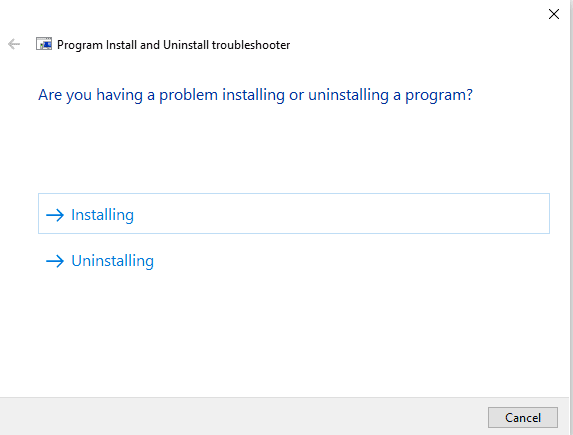
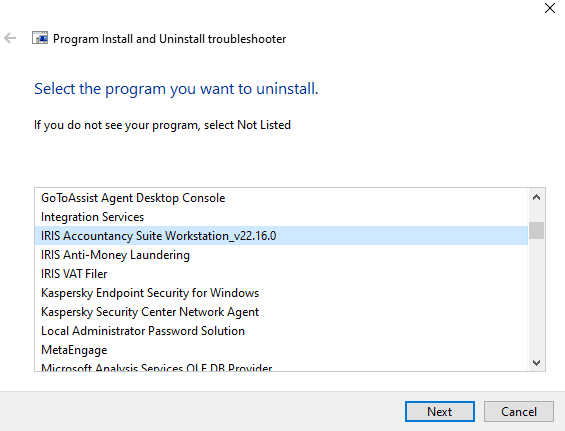
4. When you see the following screen screen, scroll down and look for IRIS Accountancy Workstation, highlight the one you wish to remove and click Next. Note: If you have more than one workstation showing, you can only select one at a time. If this is the case, you will need to re run this process to remove each one.
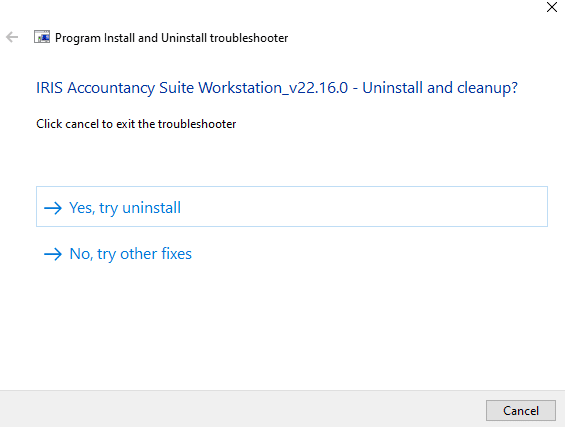
5. Please click Yes, try uninstall.
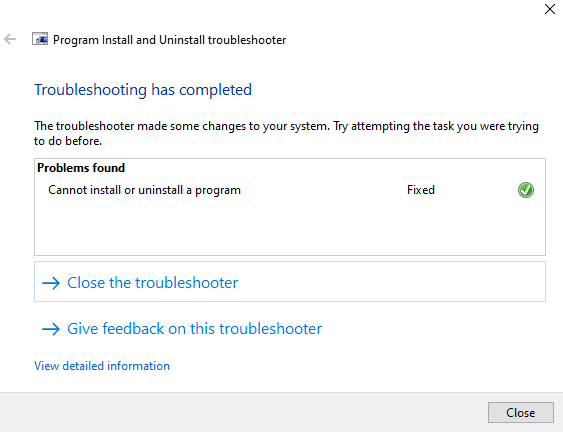
6. If you see this screen you have successfully removed the workstation install. Please try running the workstation install again, click here for further information.
We are sorry you did not find this KB article helpful. Please use the box below to let us know how we can improve it.