


Business Tax- Enter Bank details and Sort code. Boxes 945, 950, 970 and 980 are blank?
Article ID
business-tax-enter-bank-details-and-sort-code
Article Name
Business Tax- Enter Bank details and Sort code. Boxes 945, 950, 970 and 980 are blank?
Created Date
11th August 2021
Problem
IRIS Business Tax: Where to enter bank details for a repayment (Example for a loss carry back) and Boxes 945, 950, 970 and 980 are blank?
Resolution
Boxes 945/950/970/980 are blank on the tax return?- This is a HMRC restriction. This data information does not need to be shown on the Electronic Tax return. The information is only saved on the draft return for your own records.
Where to enter bank details for a repayment (Example for a loss carry back)
- Load the client and the relevant period in BT
- Data Entry
- Overpayments and Repayment claims
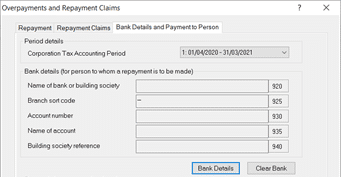
- Bank details and Payments to Person
- Click ‘Bank Details’ and New
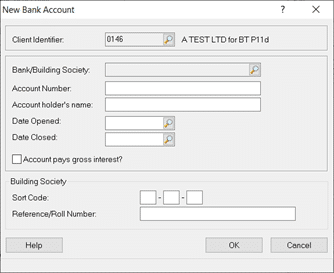
- Click the magnifying glass and either find a existing bank or create new one (Step 7)
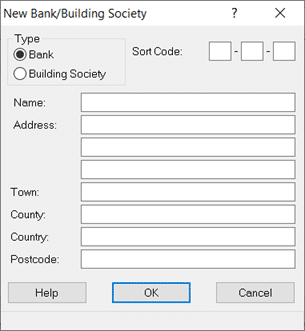
- Click New and fill in the details and sort code and OK. Highlight the newly created bank and click ‘Select’
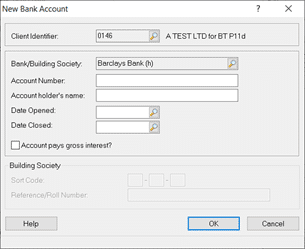
- Fill in the account number and name etc. Then Ok, select the bank again and click ‘Select’. The Bank details form will now be populated.
We are sorry you did not find this KB article helpful. Please use the box below to let us know how we can improve it.